DaedalusX64: Reverse Engineering N64 Emulation
An interactive, gamified showcase of low-level C++ HLE microcode patches, Sony PSP Graphical Unit (GU) hardware blend modes, and toolchain documentation authored by Hugo Luna (Shinydude100).
🕹️ Interactive Microcode Exhibits & Render Comparison
Exhibit 1: The Kokiri Sword Blade (*Zelda: Ocarina of Time*)
The N64 RSP emitted a specific 2-cycle combiner equation for Link's Kokiri Sword blade mesh. On PSP hardware, standard rendering paths lacked native support for this combiner equation, resulting in flat or unshaded sword geometry. Swipe or drag the comparison handle inside the PSP-1000 screen below to view the unpatched glitch versus the patched render.
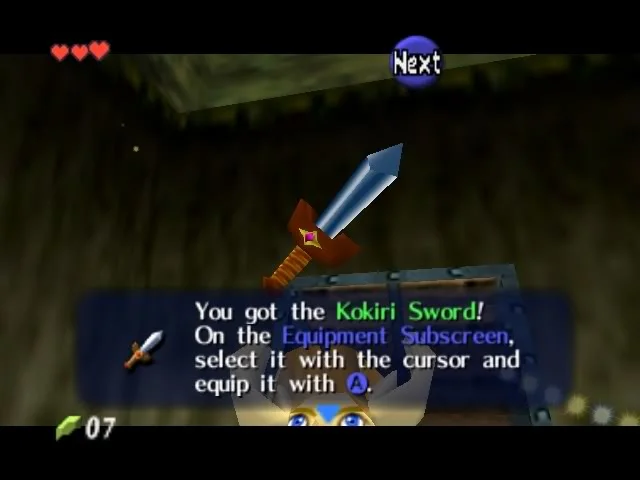
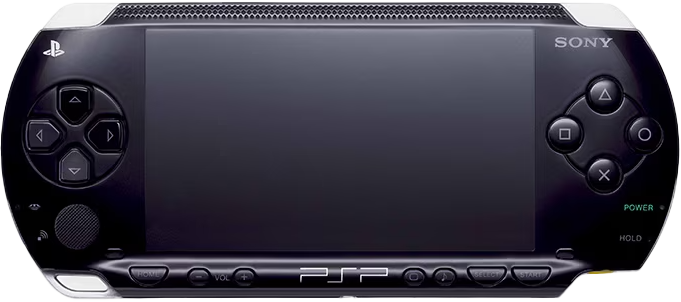
// Kokiri Sword Blade - Zelda OOT
// case 0x00177e6035fcfd7eLL:
// aRGB0: (Texel0       - Primitive   ) * PrimLODFrac  + Texel0
// aA0  : (0             - 0            ) * 0            + 1
// aRGB1: (Primitive     - Env          ) * Combined     + Env
// aA1  : (0             - 0            ) * 0            + 1
void BlendMode_0x00177e6035fcfd7eLL (BLEND_MODE_ARGS)
{
#ifdef CHECK_FIRST_CYCLE
\tif( num_cycles == 1 )
\t{
\t\tdetails.ColourAdjuster.SetRGB( details.EnvColour );
\t\tsceGuTexFunc(GU_TFX_BLEND, GU_TCC_RGB);
\t}
\telse
#endif
\t{
\t\tdetails.ColourAdjuster.SetRGBA( details.EnvColour );
\t\tsceGuTexFunc(GU_TFX_BLEND, GU_TCC_RGBA);
\t}
}
Exhibit 2: Beginner's Sword & Cuccos (*Zelda: Ocarina of Time*)
Handles the combiner math for the Kokiri Sword hilt-guard/bottom part and Cuccos ("Chikens"). Instead of forcing a dual-pass overhead, this patch passes details.PrimColour into the colour adjuster, sets sceGuTexEnvColor to details.EnvColour, and invokes GU_TFX_MODULATE.
// Beginner's sword on Legend of Zelda: OOT (bottom part) and Chikens
// aRGB0: (Primitive     - Env          ) * Texel0        + Env
// aA0  : (0             - 0            ) * 0            + 1
// aRGB1: (Combined      - 0            ) * Shade         + 0
// aA1  : (0             - 0            ) * 0            + 1
void BlendMode_0x0030fe045ffefdfeLL( BLEND_MODE_ARGS )
{
\t// By Shinydude100 & Wally & Salvy : P
\tdetails.ColourAdjuster.SetRGB( details.PrimColour );
\tsceGuTexEnvColor( details.EnvColour.GetColour() );
\tsceGuTexFunc(GU_TFX_MODULATE, GU_TCC_RGBA);
}
Exhibit 3: Alpha Channel & Blend Mode Exploration
This snippet preserves the exact inline comments written during real-time debugging on PSP hardware—capturing the trial-and-error process of testing hardware alpha flags and blend modes.
// By Kreationz & Shinydude100

\tdetails.ColourAdjuster.SetAOpaque(); // Opaque still isn't doing much on the Alpha..?
\tdetails.ColourAdjuster.SetRGB( details.EnvColour );
\tsceGuTexFunc(GU_TFX_BLEND, GU_TCC_RGBA); // Not sure if BLEND is doing anything?
}
Exhibit 4: Partial-Flashing Bomb Item (*Super Smash Bros.*)
Resolves the flashing item animation and alpha/env blending state for the Bomb item in *Super Smash Bros.* Use the interactive slider inside the PSP-1000 screen below to inspect the unpatched corrupted frame state versus the fully patched animation render.
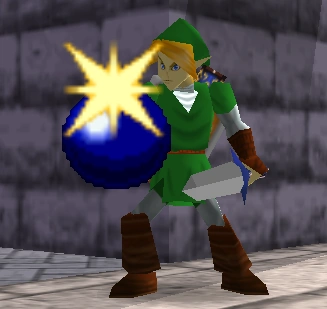
// SSB Bomb Partial-Flashing Animation
// case 0x00127eacf0fff238LL:
// aRGB0: (Texel0       - 0            ) * Shade        + 0
// aA0  : (0             - 0            ) * 0            + Texel0
// aRGB1: (Env           - Combined     ) * Env_Alpha    + Combined
// aA1  : (0             - 0            ) * 0            + Combined
void BlendMode_0x00127eacf0fff238LL( BLEND_MODE_ARGS )
{
\t// Handles Env_Alpha modulation pulse for Super Smash Bros Bomb item
\tdetails.ColourAdjuster.SetRGB( details.EnvColour );
\tsceGuTexFunc(GU_TFX_BLEND, GU_TCC_RGBA);
}
🛠️ Developer Toolchain & Documentation
An intact excerpt from the original DaedalusX64 developer documentation, guiding community contributors through setting up the MinPSPw toolchain and Visual C++ 2008 Express Edition environment.
***************
*Windows 32Bit*
***************

Compiling DaedalusX64 for PSP on Windows

-----------------Before Compiling-----------------
Make sure you have:

1.PSP DevKit (Latest) (MinPSPw may be used)
2.Visual C++ 2008 Express Edition*
3.Latest SVN Source code

*NOTE:

\tOn Windows; installing MinPSPw requires you to Open Visual C++ 08 and build Dx64 under the
\tSAME account that you installed MinPSPw, if not, the build will fail! It has something to
\tdo with the "enviornment variable setup that MinPSPw makes for that certain account.
\t(This does not affect anyone who has only 1 account, only for multi account users.)
\t
\t(If you have any ADMINISTRATIVE problems under Windows Vista when using Visual
            C++ 2008 Express Edition; make sure:
\t
\t-a. You're an Administrator
\t-b. Right-Click on Visual C++ 2008 and select "Run as Administrator"
\t(Some Programs needs these rights manually elevated--Don't ask Why -.- )
\t
-----------------When Compiling-----------------

1. Browse for your DaedalusX64 SourceCode
2. Open the DaedalusX64.sln
3. Once its opened; Right-Click on "DaedalusPSP" and select "Set as Start-up Project"
4. Hit the Green Arrow and it will begin to build, or right click on DaedalusPSP and select: Build.
5.It take a bit of time to build and you should get an error message saying that it cannot run EBOOT.PBP
6. Congratulations! You've just Compiled The Best N64 Emulator that is Available for the PSP!**

**NOTE: IF for any reason you're ingenious enough to delete any prx's just build them in C++ by
rightclicking them and selecting build. If for any reason you cannot compile this eboot and you're
CERTAIN that you have the latest sdk,devkits, and admin rights, the make sure you didn't accidentally
modify any of the source-code, in this case; delete the entire folder containing DaedalusX64 and Download
the revision once again.

Thanks a TON and I hope I was of some help to many DaedalusX64 community members, Much Love--Shinydude100

Windows XP/Vista Readme by: Shinydude100/Kreationz